
Analyzer
Lexicon has a state of the art audio analyzer packed with features that DJs need.
To analyze tracks, select them, right click and choose Analyze. In the Analyze popup, check what you want to analyze (BPM & Beatgrid, Waveform, Energy, Key) and start. The analyzer is available on the Essential and Ultimate plans.
Tracks shorter than 10 seconds or longer than 30 minutes are skipped.
BPM & Beatgrid
The analyzer has a very accurate BPM and beatgrid analyzer, below is a result summary of the current first beat accuracy:
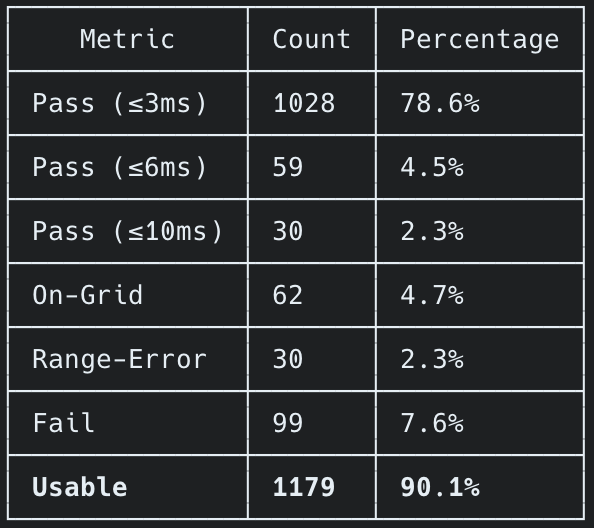
On our current testing dataset, it analyzes by far the most within 3ms accuracy of the precisely correct result. The On-Grid results are also acceptable results on the beatgrid but may be offset by 4 or 16 beats or so but still fine for DJing. Range-Error tracks are analyzed properly but require the user to specifically set the BPM range, e.g. for extremely low or high BPM tracks.
Dynamic analysis, for tracks that change BPM, is not yet available. But you can add as many BPM changepoints as you want manually and they are imported from any DJ app as well.
Waveform
Waveform analysis is required to show a waveform for your tracks. This happens on demand as well but is faster to do in bulk.
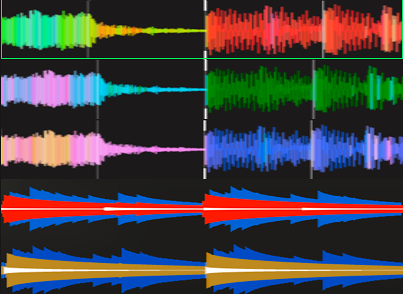
You can adjust your waveform in the settings to 3 preset options or 2 of the three-band waveforms, or choose custom colors.
After changing colors, you need to re-analyze your tracks for Waveform. If you did not change waveform colors, then you can safely keep Waveform checked in the Analyze popup as it will not re-analyze unless colors changed.
Energy
Energy analysis can fill the Energy field on your tracks. Check Energy in the Analyze popup. This works for any track as it scans your audio files. If the Energy field stays empty, check that Energy was checked, that the track is between 10 seconds and 30 minutes long, and that the file can be read.
You can also use the Find Tags utility for energy. This pulls data from Lexicon's online music database, so the track must be known there and it will not work for unknown remixes or bootlegs. It also uses a different algorithm so you will get different energy results than from analyzing.
The analyzer does not fill Danceability, Happiness or Popularity. Those fields come from Find Tags.
The energy analyzer uses an absolute based energy system which means that it tries to ensure that the more chill tracks are on the lower end and the more powerful, faster tracks are on the higher end. However this does not always work due to how music can be structured so your mileage may vary.
Key
Key analysis is essential for DJs to make harmonically compatible sets. Lexicon has two analysis algorithms for this. The built-in Lexicon analyzer performs adequately, it's fast and requires no extra setup.
We also offer the free OpenKeyScan integration for results that match industry leading paid analysis software.
You can see both Lexicon and OpenKeyScan (using MusicalKeyCNN) in this community benchmark
OpenKeyScan
OpenKeyScan is a standalone application, you can download it for free on the website. OpenKeyScan is made by the same developer as Lexicon.
In short, OpenKeyScan is a 100% free application that delivers key results similar to the industry leading key analysis software. It integrates seamlessly into Lexicon, all you need to do is leave OpenKeyScan running in the background and Lexicon can use it for its key analysis. You can also use OpenKeyScan without Lexicon by writing to ID3 tags or updating your DJ app with it.
Cues
The analyzer also includes a cue generator in a separate utility inside Lexicon, see Cue Point Generator.
Auto analysis
Auto-analysis is enabled by default so new tracks get the missing info as they are added to Lexicon. You can turn this off in the Analyze popup or in the Lexicon settings. This only applies to tracks added by dragging into Lexicon or through the Watch Folder. Tracks imported from a DJ app do not get auto analyzed.